
Key Takeaways
- SAGE Connect gives developers API access to SAGE services such as product data, inventory, order status, order forms, presentations, real-time updates, and webhooks.
- SAGE Workplace already includes product research, CRM, presentations, project management, order management, virtual samples, email tools, and other distributor workflows.
- The hard part for many distributors is not whether SAGE has data; it is getting that data into Gmail, ShopVox, commonsku, Xero, ERP systems, supplier messages, and approval processes without duplicate entry.
- Trelium turns SAGE connectivity into reusable AI-agent workflows for quote follow-up, customer sync, weekly order reporting, accepted-quote handoff, and invoice matching.
SAGE is not just another tab for promotional products distributors. It is where many teams research products, build presentations, manage customer information, create quotes, generate order forms, and keep sales work moving. The integration problem usually starts after that: a quote needs a Gmail follow-up, a new customer needs to exist in ShopVox too, an accepted SAGE quote needs to become an invoice in Xero, or a vendor invoice needs to be checked against a SAGE purchase order.
Trelium supports native SAGE workflows so teams can keep SAGE as the system of record where it belongs and automate the handoffs around it. The goal is not to rebuild SAGE. The goal is to stop asking a salesperson, CSR, or operations manager to copy the same customer, quote, product, order, and invoice context through five other tools.
In customer and prospect conversations, SAGE shows up in two ways. It is common enough that it often becomes the default CRM example in live demos, and it is also the real quoting, design, presentation, CRM, and order-management platform that distributors want connected to the rest of their business. That distinction matters: the integration is valuable only when it reaches the actual workflow, not just the API.
SAGE holds the industry context. Trelium turns that context into actions across email, accounting, order management, and customer follow-up.
What Is SAGE Connect?
SAGE Connect is SAGE's API layer for integrating SAGE data into websites, back-office systems, and internal applications. SAGE describes it as modern JSON-formatted APIs using HTTPS posts, with access to areas such as product data, inventory, order status, order forms, presentations, and more.
That makes SAGE Connect useful infrastructure, but SAGE is direct about the implementation reality: Connect is built for complete customization and requires general web-programming expertise for direct integrations. Trelium sits one layer above that work. Instead of starting with endpoints, payloads, field mapping, webhooks, and maintenance, the business starts with the workflow it wants to automate.
| SAGE Capability | What It Provides | What Trelium Adds |
|---|---|---|
| SAGE Connect | APIs for SAGE product, inventory, order status, order form, presentation, webhook, and real-time data workflows. | An agent layer that turns those data calls into complete business processes across the other systems your team uses. |
| SAGE Workplace | Product research, CRM, presentations, project management, order management, virtual samples, communication tools, and business workflows. | Automation around the handoffs: follow-up drafts, duplicate customer entry, accepted-quote handoff, order reports, and exception review. |
| PDX and industry data | Inventory and order-status information designed to reduce calls, emails, and manual supplier checks. | Contextual routing: match the data to the right customer, order, quote, PO, invoice, or person who needs to review an exception. |
How Is This Different From SAGE's Own AI Tools?
SAGE has been adding AI inside its own product surface. SAGE's AI tools include Presentation Wizard, an Image Generator, AI-powered email assistance, Blog Generator, and product-description tools. Those are useful inside SAGE because they help create presentations, write copy, produce website content, and polish product information.
Trelium solves a different problem: work that crosses system boundaries. If the job starts in SAGE but continues in Gmail, ShopVox, commonsku, Xero, QuickBooks, an ERP, a supplier email, or a customer thread, the agent has to understand the process, call the right systems, apply the company's rules, and leave a clear audit trail. That is where a SAGE integration becomes a workflow instead of a feature.
Inside SAGE
- Create a presentation with relevant products.
- Improve an email or product description.
- Build or update customer and order records.
- Use SAGE tools as the daily distributor workspace.
Across the Workflow
- Find open SAGE quotes and draft Gmail follow-ups.
- Create the same customer in SAGE and ShopVox once.
- Move accepted SAGE quotes into Xero invoicing workflows.
- Match incoming vendor invoices against SAGE purchase orders.
Example Workflow: A SAGE Quote Follow-Up Agent
A common distributor problem is simple: quotes go out, the customer gets busy, and follow-up depends on a rep remembering to check SAGE. A Trelium agent can use SAGE as the source of truth and Gmail as the action layer, while keeping the rep in control of the message before anything goes out.
- Pull SAGE documents from the selected lookback window, such as the previous 90 days.
- Find open quotes that are more than the allowed follow-up threshold, such as three business days old.
- Skip quotes that already have a matching purchase order, order acknowledgement, invoice, or other conversion signal.
- Group the remaining quotes by customer so the rep does not send scattered follow-ups.
- Draft Gmail messages using the quote's products, quantities, totals, and next-best action.
- Leave the drafts for human review or move toward more autonomous sending based on the company's approval policy.
What Customer Patterns Keep Showing Up?
The clearest SAGE automation opportunities are not abstract integrations. They are repeated handoffs that teams already perform every day. In discovery calls, distributors describe spending meaningful time in SAGE while also needing the same customer, quote, logo, PO, invoice, or follow-up context inside another tool. That creates a natural place for Trelium: leave the judgment and customer relationship with the team, and remove the repeated system switching.
Quote follow-up without memory-based chasing
SAGE has the quote. Gmail has the conversation. The rep needs the next touch to happen before the deal goes cold.
Before Trelium
- Open SAGE manually to review quote status.
- Check whether the customer already accepted or converted.
- Copy quote context into a follow-up email.
With Trelium
- Monitor open SAGE quotes on a schedule or trigger.
- Skip converted quotes and group remaining ones by customer.
- Prepare personalized Gmail drafts for approval.
Customer and logo sync across SAGE and ShopVox
One distributor described spending much of the day across ShopVox and SAGE, then asked for one customer-entry flow that updates both systems.
Before Trelium
- Create the customer in one system.
- Rekey the same customer into the other system.
- Upload logos and supporting files again.
With Trelium
- Collect customer and logo details once.
- Create or update records in SAGE and ShopVox.
- Flag duplicates or missing fields for review.
Accepted SAGE quote to accounting workflow
Once a SAGE quote is accepted, the next step is often outside SAGE: invoice creation, accounting review, or payment follow-up.
Before Trelium
- Download or copy accepted quote details.
- Enter invoice details into Xero or another accounting system.
- Reconcile later if supplier invoices arrive with mismatches.
With Trelium
- Move accepted quote data into the accounting workflow.
- Create draft invoices with the right customer and line context.
- Compare vendor invoices against SAGE POs and escalate mismatches.
What Can You Automate Around SAGE?
SAGE integration becomes most valuable when it removes duplicate entry and stale status checks. The workflows below are the ones that repeatedly come up because they touch multiple teams: sales, customer service, operations, purchasing, and accounting.
Turn Product Research Into the Next Step
SAGE product research often starts the work, but product research is not the end of the workflow. Trelium can use product, inventory, and presentation context from SAGE to prepare quote drafts, attach relevant product information, apply account-specific rules, and route the result to the right salesperson for review.
Sync Customers Across SAGE and Other Systems
When a new customer or contact is created, Trelium can synchronize the relevant profile, logo, and business context across SAGE and another system such as ShopVox, commonsku, or a CRM. The agent should not blindly duplicate bad data; it should check for possible duplicates, missing logos, malformed emails, and account ownership questions before updating records.
Create Weekly SAGE Reports Automatically
A weekly SAGE report can pull recent forms, group them by type, calculate totals, and email a clear summary to the team. The useful version is not a raw export. It should show status, totals, client names, job numbers, owners, and dates so a manager can scan the week without opening SAGE first.
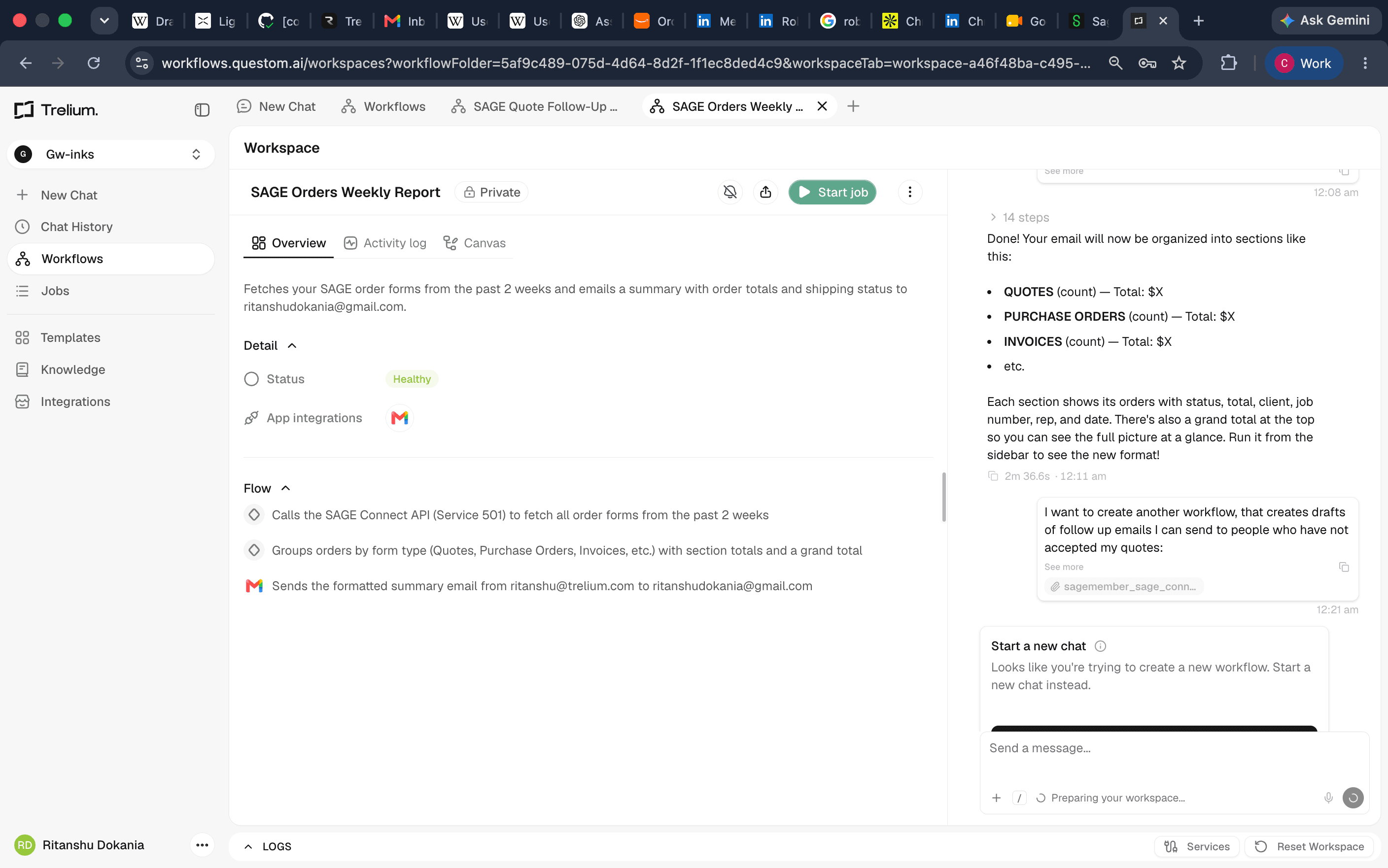
In the workflow above, the agent calls the SAGE Connect API, fetches recent order forms, groups records into sections such as quotes, purchase orders, invoices, and other forms, calculates section totals, and sends a formatted email summary. That is not just a data pull. It is a business-readable report that tells the team what changed and where attention is needed.
Match Vendor Invoices Against SAGE Purchase Orders
When vendor invoices arrive by email, Trelium can identify the related SAGE purchase order, compare line items, quantities, unit costs, freight, and totals, then route only exceptions to a human. One practical edge case is vendor-name ambiguity: if two records share the same or similar name, the agent should use PO numbers, amounts, dates, supplier context, and prior history instead of guessing.
Handle Routine SAGE Support Communications
Some workflows need a loop with support or a supplier before they can finish. Trelium can draft the question, include the relevant SAGE document context, watch the reply, and continue the workflow once the missing information arrives. A person still owns the exception policy; the agent removes the inbox babysitting.
Why Do PDX and Real-Time Data Matter?
SAGE's SAGE Connect and PDX explainer frames the industry goal clearly: reduce unnecessary calls and emails by making inventory, order status, and other operational data available in real time. SAGE also notes that SAGE Connect can make a single integration path possible for participating PDX vendors.
For distributors, real-time data only pays off when it changes the work. Inventory visibility should update the quote. Order status should update the customer. A purchase order should match against an incoming invoice. An exception should reach the right person before the customer asks. Trelium's job is to make the real-time data operational.
Do You Need to Replace SAGE?
No. A good SAGE integration should make SAGE more useful, not push the team into a new system for work that SAGE already handles well. Trelium uses SAGE where SAGE is strongest and connects it to the software that owns the next step: email, accounting, order management, CRM, ERP, supplier communication, reporting, and approvals.
That also avoids the redundancy concern some teams raise when they already have SAGE product data on their website or product tools elsewhere. Trelium is not trying to add another product catalog for the sake of it. The cleaner implementation is to decide which system owns each record, then let the agent move work between systems without creating conflicting sources of truth.
Frequently Asked Questions
Does Trelium Integrate With SAGE?
Yes. Trelium supports SAGE workflows and can use SAGE information inside AI-agent workflows that also touch Gmail, Xero, ShopVox, commonsku, CRM systems, order-management tools, and other business software.
Does Trelium Replace SAGE Connect?
No. SAGE Connect is the API infrastructure for communicating with SAGE services. Trelium uses SAGE connectivity as part of a larger workflow layer: business rules, decisions, approvals, updates, reporting, and exception handling across multiple systems.
Can Trelium Connect SAGE to Gmail?
Yes. For example, Trelium can identify open SAGE quotes that need follow-up and prepare personalized Gmail drafts for the account owner. The company can decide whether those drafts always require human review or whether certain low-risk messages can be sent automatically.
Can Trelium Connect SAGE to Accounting Systems?
Yes. When the connected systems make the required data available, Trelium can help move accepted SAGE quote or order information into accounting workflows such as Xero invoicing, payment follow-up, vendor invoice review, and PO matching.
Useful SAGE Resources
Useful SAGE Resources
What Is the Bottom Line?
SAGE already gives promotional products distributors deep industry infrastructure. SAGE Connect makes important data accessible. SAGE's own AI tools improve work inside the SAGE product. Trelium adds the workflow layer around that ecosystem so SAGE data can trigger the next action in Gmail, accounting, order management, CRM, ERP, reporting, or invoice review.
The practical question is not whether SAGE can store the quote, product, order, customer, or PO. It can. The question is what should happen next, who should review it, which other system needs to be updated, and which exceptions should get escalated. That is where Trelium's SAGE integration belongs.
"Why use SAGE and not find peace? With Trelium's integration, you could actually become a sage." - Ritanshu Dokania -Co-Founder, Trelium

Chirag Gupta
Member of GTM Staff
Get started
Ready to see Trelium in action?
Schedule a 30-minute conversation about the workflow you want Trelium to handle.
Talk to a Human→